
FREE CHROME EXTENSION FOR AGENCY OWNERS
Pull 1,000s of Business Leads From Google Maps — In Minutes
No spreadsheets. No manual copy-pasting. No monthly fees. Just install SmartScraper and export leads for free.

1,000,000+ Leads Extracted
No Credit Card Required
WHY AGENCY OWNERS USE IT EVERY DAY
Everything You Need To Build a Cold Outreach List — Fast
Extract Google Maps leads — no monthly subscription required
Get business name, phone number, address, website, rating & more in one click
Export to clean CSV instantly — ready to upload to any CRM or cold email tool
Works on any niche, any city — just search Google Maps and hit extract
WHY YOU NEED THIS
Stop Wasting Hours Building Prospect Lists Manually
Manually copying business names and phone numbers one by one
Paying $39–$99/month just to export leads from Google Maps
Building slow, incomplete spreadsheets full of missing data
Spending hours on prospecting instead of closing clients
Missing leads because your list-building can't keep up
Extract hundreds of targeted leads in minutes with one click
No subscription required to get started — download and go
Clean, complete CSV export ready for your outreach workflow immediately
More time closing deals, zero time wasted on manual data entry
A consistent, scalable pipeline of fresh local business leads

Search Any Niche
Type any keyword + city into Google Maps. SmartScraper instantly captures every business result from that search — pull a thousand leads as fast as you can click
One-Click Export
All lead data is packaged into a clean, ready-to-use CSV file in seconds. Drop it straight into Apollo, Instantly, GoHighLevel, or any cold outreach tool.

No Cost To Get Started
No credit card.
Download the extension and start
extracting leads from
Google Maps today.
All the Data You Need To Start Outreach Today
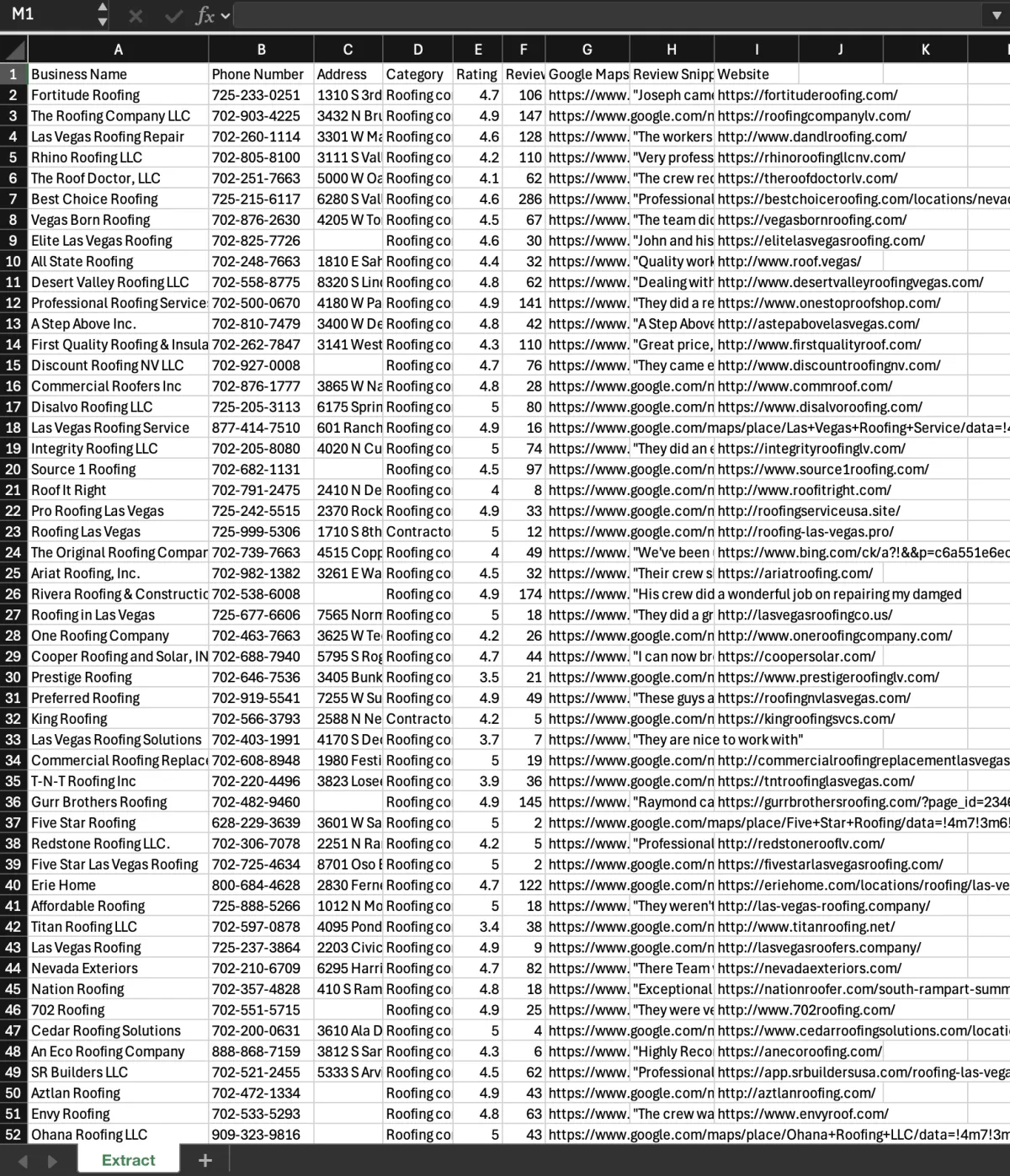

Business Name, Phone & Address
Every core contact detail you need for cold calling or direct mail — pulled automatically from Google Maps and organized in one file.

Website, Category & Google Maps URL
Know exactly who you're reaching out to before you send a single message. Filter by niche, qualify by presence, and personalize at scale.

Rating, Review Count & Review Snippets
Instantly qualify leads based on their Google reputation. Target businesses that need your help — or the ones already thriving in your niche.
Up and Running in Under 3 Minutes
NO ACCOUNTS. NO SETUP. NO LEARNING CURVE.
SmartScraper runs directly inside your Chrome browser. Download the extension file, unpack it into Chrome in two clicks, and you're live. No dashboard to figure out, no account to create.
Just head to Google Maps, search your niche and city, and click extract. SmartScraper captures every result on the page and packages it into a downloadable CSV — ready for your outreach tool in seconds.

TESTIMONIALS
"1,000,000+ leads extracted and counting"

"Works super well, gets me a ton of leads and its free so cant go wrong"
- Mary
"Love being able to open up google maps and just export out a spreadsheet, makes generating leads much easier, thanks! "
- John
"This has saved so much time!! i used to manually add businesses to spreadsheets before cold calling and now i can focus on the main thing"
- Teresa
"The setup took me about 2 minutes to figure out and im not even tech savvy, then worked like a charm as described!"
- Jake
THIS IS FOR YOU IF YOU…
SmartScraper Is Perfect For
Marketing agency owners
web design agency owners
cold email prospectors
seo agency owners
lead gen freelancers
social media marketers
business consultants
sales development reps
recruitment agencies
virtual assistants
gohighlevel users
anyone who sells to local businesses
Satisfaction guarantee
Nothing To Lose
No trial periods. No credit card required. Download SmartScraper and start building targeted prospect lists from Google Maps in minutes. If it doesn't save you hours on prospecting, you've lost nothing — but we're pretty confident it will.

STILL GOT QUESTIONS?
Frequently Asked Questions
Is SmartScraper free to use right now?
Yes — SmartScraper is completely free to download and use today!
Why do I have to install it as a zip file instead of the Chrome Web Store?
SmartScraper is currently in the final stages of Chrome Web Store review. In the meantime, you can install the extension manually in under 2 minutes by unpacking the zip file into Chrome. We've included a simple step-by-step guide to walk you through it.
What data does SmartScraper extract?
SmartScraper pulls Business Name, Phone Number, Address, Website, Category, Rating, Review Count, Review Snippet, Booking URL, Google Maps URL, and Extraction Date — all exported to a clean CSV file ready for your outreach workflow.
Start Extracting Leads From Google Maps Today
Join thousands of agency owners building targeted prospect lists in minutes, not hours.
Copyrights 2026 | SmartScraper | Privacy Policy | Terms & Conditions - 1070 Maple Way, Jackson, WY 83002